Raptor integration product guide
Discover Raptor integration - an add-on that is focused on recommendations for your visitors.
What is Raptor integration
The Raptor integration provides a seamless integration between Cohesivo and the Raptor recommendation engine.
Its primary goal is to enable editors and managers to deliver personalized experiences across digital channels, which helps to increase conversion rates, drive sales, and improve user engagement.
By bringing content and recommendations together, the connector makes it easy to build and manage personalized experiences.
This approach simplifies integration while supporting personalization across different sites and markets.
Availability
To use the Raptor integration, you must first make arrangements with Ibexa.
Raptor tracking
To start tracking user interactions, the tracking script needs to be added to the website’s layout.
Capabilities
Tracking
Raptor tracking allows you to collect data about how users interact with your products and content.
This gives you the data you need to better understand user behavior, improve recommendations, and support personalization.
Recommendation blocks
The Raptor integration add-on provides a set of ready-to-use recommendation blocks that can be added directly in the Page Builder.
These blocks can be configured to adjust how they work and what they display. Content, Product, and Commerce recommendations can be placed on landing pages using these components.
Editors can use these blocks to display tailored product recommendations, promote related content, and highlight items that are trending or recently viewed.
Recommendation blocks are organized into dedicated categories, each grouping blocks based on the type of recommendation they provide:
- Recommendations: Content - presents content recommendations:
- Recommendations: Product - displays product suggestions based on visitors’ browsing history:
- Recommendations: Commerce - shows recommendations based on visitors' purchase history (buy and basket events):
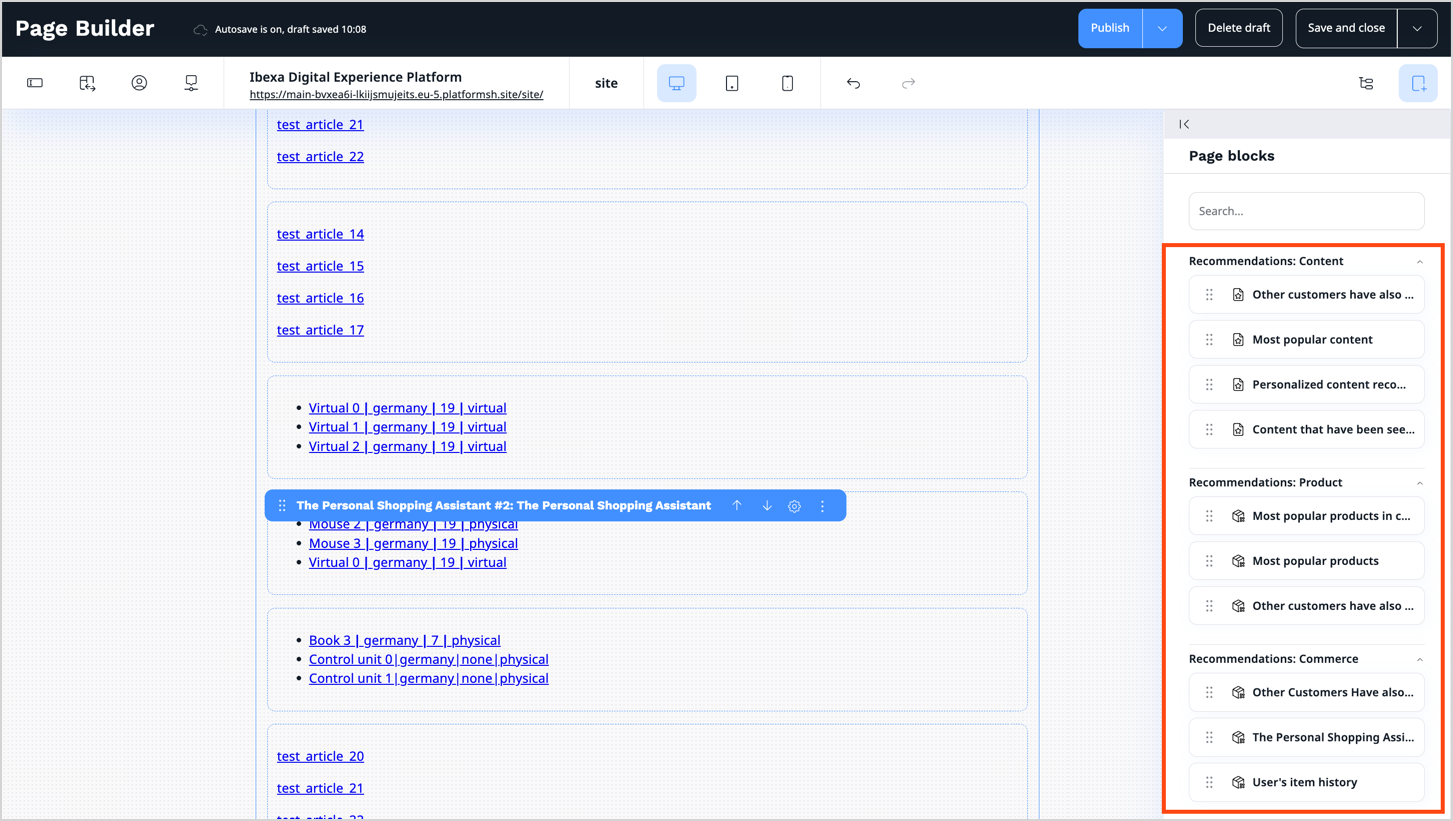
For a complete description of Recommendation blocks see Recommendation blocks in User Documentation.
Benefits
Understand user behavior
Thanks to tracking functions, you can capture how users interact with your products and content, giving you valuable insights into their behavior. It helps you make data-driven decisions to improve engagement and personalize the user experience.
Highlight recommendations
Use recommendation blocks on your websites to highlight content targeted at your customers. Deliver relevant content and build trust in your brand.
Suggest content to boost retention
Help users find content of their interest quicker. Showing visitors content and products that match their interests helps keep them engaged and encourages them to come back.
Meet customer expectations and increase engagement
Recommendation blocks highlight products that match customers' interests. Tailored content boosts engagement by showing visitors information and products that align with their interests and fulfill their needs. This strengthens the connection between your brand and your audience, encouraging them to spend more time on your site and return more often.
Increase average order value
Use tracking for predictive analysis and find out what motivates users to put extra items into their carts. Start building predictions of their behaviors and suggest products your visitors are willing to buy.
Track performance and increase conversions
Use the Raptor service in your Commerce shop and see how recommendations drive sales. Keep track of which recommendations are shown to visitors and measure conversion rates to evaluate their effectiveness against your goals.